Disagreements stay in the result.
Each section carries its source and a date when available. Conflicting versions remain attached, so the agent can see what’s contested. Source priority is explicit; newer text doesn’t silently win.
'/%3e%3cellipse%20cx='512'%20cy='748'%20rx='292'%20ry='34'%20fill='%23050605'%20opacity='0.4'%20filter='url(%23shadow)'/%3e%3crect%20x='190'%20y='590'%20width='644'%20height='154'%20rx='58'%20fill='url(%23company)'/%3e%3crect%20x='246'%20y='432'%20width='532'%20height='138'%20rx='54'%20fill='url(%23team)'/%3e%3crect%20x='314'%20y='292'%20width='396'%20height='120'%20rx='50'%20fill='url(%23personal)'/%3e%3cpath%20d='M248%20456h528'%20stroke='%23d9f0e3'%20stroke-opacity='0.12'%20stroke-width='5'%20stroke-linecap='round'/%3e%3cpath%20d='M192%20615h640'%20stroke='%23e0f0f7'%20stroke-opacity='0.12'%20stroke-width='5'%20stroke-linecap='round'/%3e%3crect%20x='100.75'%20y='100.75'%20width='822.5'%20height='822.5'%20rx='184.25'%20fill='none'%20stroke='%23ffffff'%20stroke-opacity='0.08'%20stroke-width='1.5'/%3e%3c/svg%3e) ContextCake
ContextCakeOpen source · Runs locally
ContextCake brings together the relevant parts of your project docs, team decisions, and personal notes without losing where they came from.
Your agent gets a traceable result through MCP, with every source, date, and conflicting version still attached.
Apple silicon · Signed & notarized · Download for Intel Mac
WSL: install from source
decisions/primary-dbPostgres in every shared environment.
Postgres for OLTP, yes — but we added ClickHouse for analytics after the reporting queries started locking the primary.
Platform team owns provisioning, upgrades, and the backup policy.
An architecture doc explains the database choice. A team runbook adds an exception. Your notes cover local setup. Handing an agent one file misses the rest. Pasting everything in leaves it to sort out the contradictions.
Add Markdown folders or GitHub repositories. Your files stay where you keep them. Start with a single source and add more when you need them.
Order your sources. For matching sections, the higher source takes precedence. Sections it doesn’t define are inherited from the sources below.
Connect your AI tool through MCP. It can find the relevant context and read the combined result, including where each section came from.
searchread_fileSources includedThis is the cascade: combine matching sections across sources, while keeping the other versions visible. Read the merge rules
Browse the combined context in the app. Follow a section back to its file. Compare a disagreement before deciding what to change.
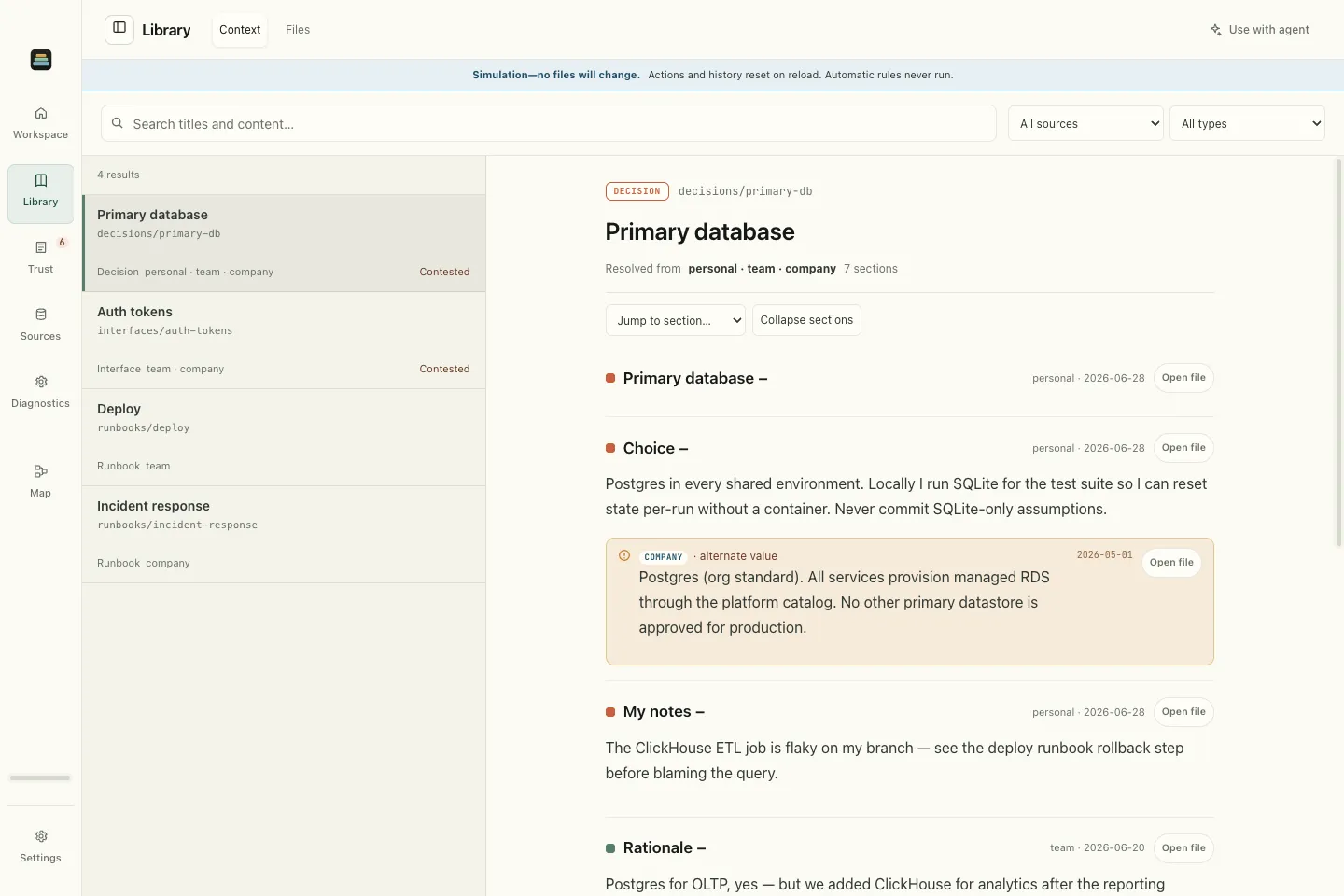
Each section carries its source and a date when available. Conflicting versions remain attached, so the agent can see what’s contested. Source priority is explicit; newer text doesn’t silently win.
Follow links between decisions, runbooks, and notes. ContextCake exposes those connections as a knowledge graph that both you and your agent can explore.
Run ContextCake locally. Keep using Git and the editors you already know.
Read the source on GitHubThe core runs on Node.js with no runtime dependencies. ContextCake reads and combines your sources locally; the AI tool you connect receives the context it requests.
With capture enabled, preview a session finding before sharing it with the team. Promote reviewed captures into durable team context.
Advanced setups can connect a trusted MCP source that implements the ContextCake graph contract. Its content joins the same cascade as your files.
MCP source guideKeep those files for instructions your coding tool loads directly. ContextCake adds a way to search and read knowledge across sources through MCP, including shared decisions and your own notes. You can include existing instruction files in a source; your tool’s native instruction-loading behavior stays the same.
You can start with a folder of Markdown files. To combine versions of a document across sources, they need the same relative path (the concept ID) and matching section keys. Explicit section anchors give you precise control. ContextCake doesn’t infer that two unrelated files describe the same thing.
How documents and sections matchLocal sources are read and combined on your machine. When a connected AI tool requests context, that content is passed to the tool and is subject to its data handling. GitHub sources use GitHub; team sync uses the repository you configure. Only run MCP source commands and manifests you trust.
Read the trust modelNative Diagnostics shows source health, retrieval performance, and indexing activity without Docker. The signed Mac app also includes optional Local Grafana dashboards and traces as an experimental feature. Telemetry stays local in this version.
Explore diagnosticsSix read-only tools let it search, read combined context, list concepts, follow links, find captures, and catch up on changes. Capture tools are opt-in.
searchread_filelist_conceptsget_linksfind_captureswhats_newPacks are optional collections of rules, templates, examples, and reference material for a specific kind of work. Inspect their files and add them as a source alongside your own knowledge.
Browse PacksAdd a folder, connect your coding agent, and ask it about your project.